The Best Worst Email Client
In November of last year, I wrote about what I did and didn’t want to do in Emacs. It’s great for anything that involves text editing/processing, good for certain kinds of management tasks (it’s a great Git client, and even has surprisingly useful file management tricks up its sleeve); it’s not—at least to me—great for tasks that involve viewing, like RSS reading and PDF viewing. I’ve kept putting this to the test, and stand by most of what I said back then. Most of the time I’d rather view PDFs in Apple’s own Preview. When it comes to RSS, I want good typography and the ability to read on my iPad and iPhone—Elfeed, for all the virtues it undoubtedly has, is a nonstarter for me. (Yes, I really tried. More than once.)
Email, though…well.
Here’s the thing about me and email clients: I hate pretty much all of them. The last email program I truly loved was Bare Bones’ Mailsmith. Quoting from Matt Neuburg’s 2003 (!) review:
Since the notion that your current email client might need replacing is probably threatening to you, let me help by giving you, up front, some reasons to stop reading this article altogether. You shouldn’t proceed if you like your email as more than text – HTML, format=flowed, or pictures, rendered right in your client program. Mailsmith displays just text: you can easily open attached HTML or images in another program, but you won’t see them within Mailsmith itself. That suits me perfectly, since pure text (plus attachments) is just what I think email should consist of. But if you really need to see email messages with pictures, tiny print, underlines, or funny “quote bars” down the side, don’t consider Mailsmith.
You also shouldn’t read on if you are religiously opposed to an email client that keeps its messages in a database. I actually agree with that position; since email is just text, why over-engineer with a database and all its attendant problems, such as huge file sizes and data you can’t retrieve if things go wrong? This is a prejudice I’ve managed to repress in order to accept Mailsmith; perhaps, after some soul-searching, you could do likewise.
Users of Emacs’s mu4e might resonate with a lot of that.
Mailsmith is, if anything, quirkier than mu4e. Unlike Mailsmith, mu4e uses standard Maildir folders, using its database solely for indexing/searching. It can display HTML email inline (and send it, too). And Mailsmith was POP-only. Its developers decided that re-engineering its database back end to work with IMAP wasn’t worth the effort, a choice which may have been technically correct but spelled inevitable doom.
Now, I’ve tried a lot, like, a lot, of “modern” email clients. The built-in Apple email client is extremely straightforward, but underpowered. Thunderbird is too lumbering and heavyweight for what I want. Hipster ones like Spark are pretty, but focus on things I don’t care about. Mimestream is solid, but it’s Gmail-only. Microsoft Outlook is, unfortunately, Microsoft Outlook. MailMate is nerdy and, in some ways, the most obvious spiritual descendant of Mailsmith, but I find some of its UX inscrutable. Yes, I am aware of the irony of saying this just before describing an Emacs-based client.
And increasingly, commercial email clients are expensive and/or subscription-only. MailMate, $40/year unless you want to freeload. Mimestream, $50/year, no freeloading option, and still only works with Gmail. The beautiful and powerful new client MailMaven, $75 with updates for 12 months—if you want updates after that, it’s another $75. Superhuman, a business-focused mail client that some podcasters I listen to love, a staggering $300/year. Look, folks, I’m a late middle-age dude living on contract work. I need to reduce the number of things I’m paying for.
A big reason I didn’t test out mu4e last year was because it’s a bear to set up. See, while I said mu4e works with IMAP, in truth you need to set up another program like isync/mbsync, to get your actual mail in and out of your computer. And if you have multiple email accounts, you have to set up Maildirs and configuration for each of them. This isn’t difficult, but it’s very Unixy—and up until recently, I led a multi-Mac lifestyle, and damned if I was going through all this on two computers. Early this year, though, I switched to a single desktop-class laptop, turning my old desktop into a server. So, I took the plunge.
After you set up mail sync, you still need to configure mu4e itself. See, mu4e is, behind the scenes, just a search engine: when you ask it to open your Gmail account inbox, you’re executing the search query maildir:/gmail/INBOX. You create what mu4e calls “bookmarks” for those queries, which lets it behave like a conventional email client. Then you need to set up “contexts” for your different accounts, telling it which folders to use for drafts, sent messages, trash, and archiving (which mu4e calls “refiling”). In typical Emacs fashion, you do this with, you guessed it, Lisp code. (The “refile” command can be a Lisp function itself, because of course it can: you could make it act intelligently based on subject and/or sender, sending some things to archive, some things to a receipt folder, and so on. This is something you can’t do with other email clients.) Again, this sounds more difficult than it is, but it’s definitely not click and go like most modern mail clients.
After you slog through all of that, behold the glory of mu4e!
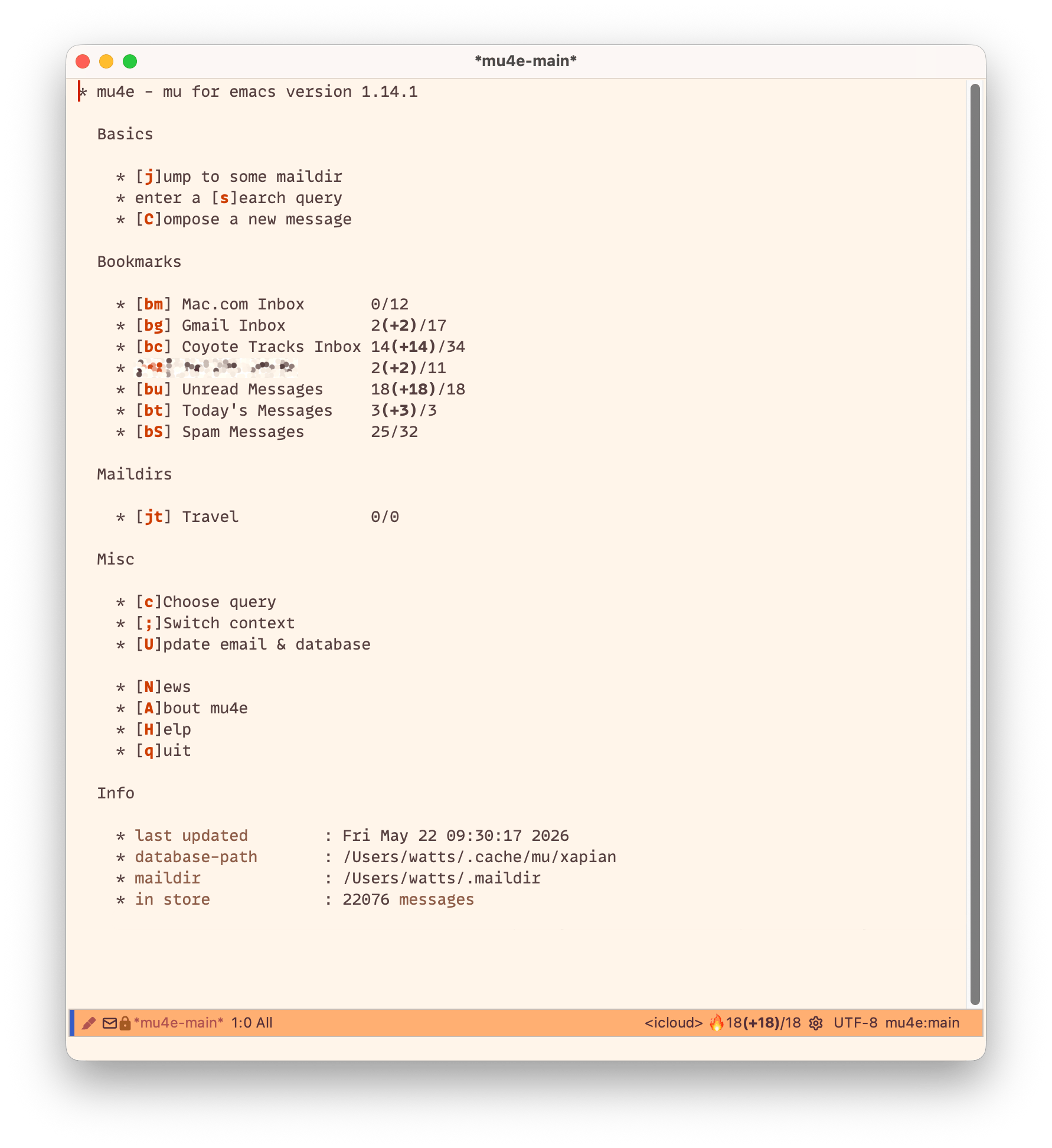
Okay. You know how we talk about Mac-assed Mac apps? This is the opposite of that.
But look closer. A mail count like “2(+2)/17” lets me know that, in that inbox, there are 2 unread messages out of 17 total; the “+2” is how many are new since the last time I looked. Since these are search queries, they can do things other mail clients can’t easily do; I have unified views for unread, today, and spam. Normally I don’t like unified views because I want to quickly know what mailbox any given message is actually in, something not all mail clients are good at. This one is, as we see from the message view:
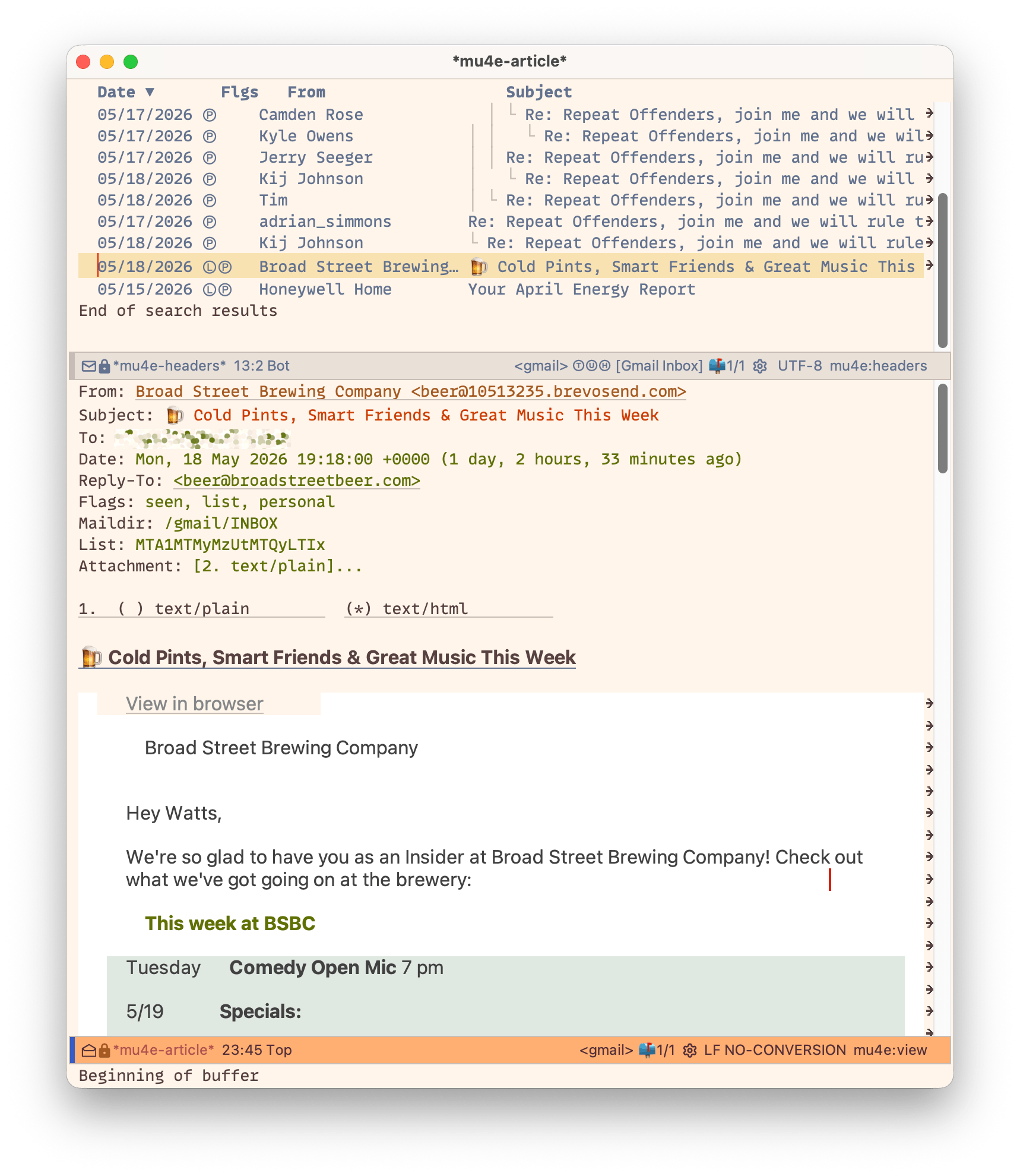
Again, not a thing of beauty, but again, interesting. It’s great at threading conversations, and that message view is very functional. We know what mailbox this message belongs to because “Maildir” is one of the headers. I also know it’s from a mailing list. The view of the message from Broad Street Brewing shows the HTML email as rendered by Emacs’ bare-bones internal web browser. If I wanted to, I could open the “real” HTML email either in a separate web browser window or using WebKit inside Emacs. The advantage of mu4e’s text-forward approach is that you can open any email safely, without triggering tracking or JavaScript payloads. And, this thing is fast. I “only” have 22,000 email messages or so, but it can search hundreds of thousands of email messages instantly and accurately.
Beyond that, you have all the features you’d expect, even if the UX takes getting used to. But just like one of Mailsmith’s secret weapons was using BBEdit’s editing engine, one of mu4e’s secret weapons is using Emacs. When you’re writing a message, you can do everything Emacs can. This is where I was most wrong in my original take: while I may spend more time reading email than writing it, having a full editor when I am writing it is fantastic. (That you can integrate mu4e and Org mode, the infamous outliner/agenda/notebook system, is just icing on the cake.)
So have I sold you on it? No? Of course not. Look, not only is mu4e not for everyone, it’s not for most people. But if you’re an Emacs fan—or at least Emacs-tolerant—and you’re either a serious mail power user or someone like me who just hates most normal email clients, setting it up may just be worth the initial pain.
As for how to set it up, that’s a capital-J Journey. A couple of pages which were helpful to me:
To support my writing, throw me a tip on Ko-fi.com!
©
2026
Watts Martin
·
License: CC BY-NC-SA 4.0
Contact: Mastodon ·
Bluesky ·
Email