To BYOK or Not to BYOK
There’s a whole cottage industry/subculture around “distraction-free writing devices” or “writing decks”—digital typewriters. The idea behind them is that if you’re writing on a gadget with no internet connectivity, no social media, no games, something that you can only type on, it’s going to sharpen your focus.
On the face of it, it’s not a bad idea: the truth is, I get distracted pretty easily. When I’m stuck on something, it’s far too easy to start checking Mastodon (or, if this was a decade ago, Twitter), or email, or browse the web listlessly. But many writing decks have dubious ergonomics; many have weird keyboards; some are surprisingly large; some make getting files off of them a capital-A Adventure; nearly all rival a lower-end iPad in price.
But, then came the BYOK.
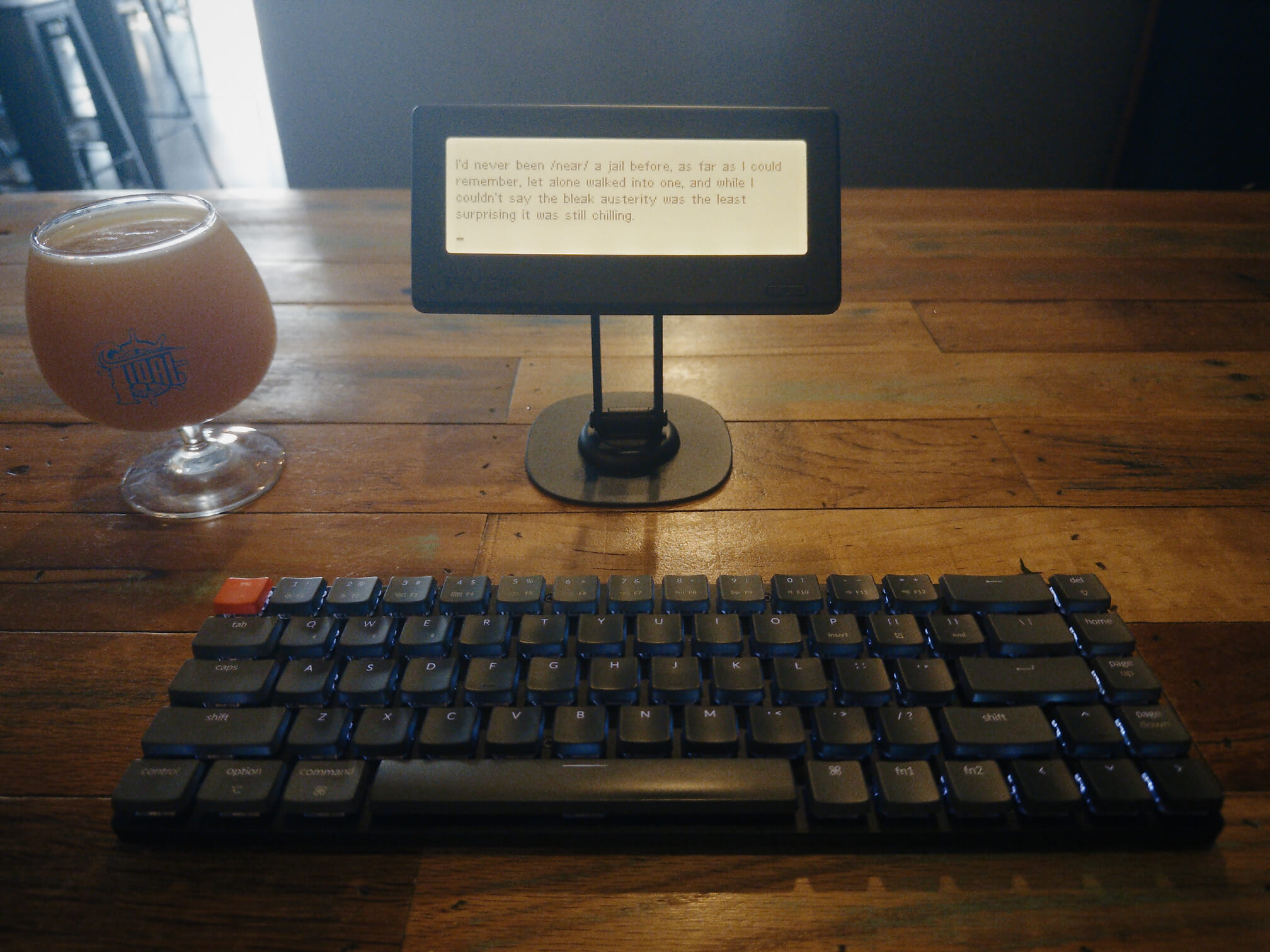
The name is an acronym for “Bring Your Own Keyboard,” and that’s the key difference between it and, well, nearly about everything else: it’s a display, a basic text editor, and the support firmware. That’s it. You connect your own keyboard with Bluetooth or a USB-C cable, so the keyboard style and ergonomics are all up to you.
I’ve had one for about two weeks and written on it in a few test runs at home, but didn’t take it out of the house until today. (I’ll get to why in the section on software below.)
Hardware
The BYOK—formally, the “BYOK Device,” to distinguish it from the BYOK Studio software—is a little wider and taller than my iPhone 17 Pro in landscape mode, and considerably thicker. It has a monochrome LCD, a power button on the front, and four buttons on the back that let you page through menus when a keyboard isn’t connected to it. It also has a MagSafe-style ring on the back that lets you mount it to nearly any phone stand, including the simple ring stand it comes with. It charges by USB-C, too; BYOK claims it lasts 20 hours on a single charge.
The display is crisp and readable, with an adjustable backlight. It doesn’t feel like having a light shined in your face the way using a modern display does. I’m not sure what its resolution is, but the fonts are super chunky; if you want to get six lines on the display at once, lowercase letters will be only five pixels high.
Software
Files on the BYOK go in “Projects,” which are directories. You can’t nest projects/directories, and you can’t have a file that isn’t in a Project. You can add simple extensions called “Tools”, written in Lua.
The text editor is rudimentary, largely by design. It uses the control key rather than the command/alt keys for actions, so cut, copy, and paste are ^X, ^C, and ^V. You can move and delete by word and screen, and select by holding down SHIFT.
As you might guess, there’s no functionality for Emacs-style keybindings, even the subset that’s been built into macOS from the first days of OS X. This is a little bit of a headache. There’s also no way to do modifier remapping, which is mild hell for those of us who’ve remapped the Caps Lock key to be a control key.
There are three ways to get files on and off the BYOK:
- The company’s preferred method is syncing the BYOK over wi-fi with BYOK Studio, their proprietary software available both as a web app and as a desktop app.
- You can put the BYOK in “Disk Mode” and just copy files to and from it.
- The BYOK is actually writing to a MicroSD card; you can eject that, and copy files to and from it.
Studio is a reimagining of a writing environment like Scrivener but for plain text. It has some impressive features and an attractive UI, at least from the screenshots. If I were still using Scrivener, or even Ulysses, I’d give it a spin, although the subscription price of $84/year with the annual discount is damn steep compared to the others. But, as established, I’ve become an Emacs person, so—just as with Scrivener or Ulysses people, or weirdos using Word by choice—I’m stuck with Disk Mode.
Y’all, Disk Mode is not fun.
I know some nerds have been angry for years that you can’t simply mount an iPhone like a USB drive and copy files to and from it, going back to the days of the iPod. On principle I get it. In practice, syncing is so much easier it’s not even funny. You press a button and files go where they’re supposed to, the end. Sometimes you don’t even have to press a button.
So this is what took me a few extra days: I ended up detouring to put together my own BYOK package for Emacs. It still needs work, but it’s good enough to have gotten me out in the “field” working on both this article and a novel chapter. (I’m writing that novel in Org Mode, in one file—which would be essentially impossible to navigate on the BYOK. I had to come up with a way to make the BYOK handle individual chapters as files on the device and as “subtrees”—headings plus everything after them, up to the next heading of the same level—in Emacs.) This is an obscure area where the BYOK’s minimalism works against it. It doesn’t have a clock, so it can’t put timestamps on files, which means there’s no easy way for it to flag that you’re copying older data over newer. Yes, I gave my package a backup option, but “make it smarter” is definitely next on the list.
In practice
Okay, I can definitely see the appeal; when I get stuck now, I’m left staring at the little BYOK screen, with nothing to do other than think about the next sentence. I find I truly am more likely to push through tiny blocks this way—even though it’s fairly trivial to pick up my phone, it’s just enough extra friction that I mostly haven’t.
The problem I instantly had, though, is that even when I’m writing fiction, I need other files. For the novel, I have a notes document which is thousands of words long—not to mention a dedicated Safari tab group for research. I can use the phone, of course, yet that introduces just a little extra temptation. None of this is the BYOK’s fault, per se; it’d be an issue with any other writing deck.
While I knew what I was getting into with the display in the abstract, in the reality: woof. I appreciate the aim of uber-portability, but I don’t care about being able to slip this in a pocket. I would have been happier with a little more space in both directions, and with a little higher pixel density. None of the serif fonts look nice, and monospaced fonts take up too much horizontal spsace for my taste. Many of the extra downloadable fonts seem to be conversions from vector fonts, and they’re horrible, with weird blocky artifacts, strokes that erratically vary width, and letters that run together in certain combinations. The “Arial” typeface I’m using (which has little relation to either Arial or Helvetica beyond being sans serif) is one of the only ones that maintains sharp legibility while hitting an acceptable character density.
The $64,000 question—well, at least the $199 question—is this: does a BYOK keep me on task during a first draft better than sitting down in front of Emacs does? Do I get any advantage to taking this setup out with me rather than simply taking a laptop, or perhaps taking this very keyboard (a Keychron K7) paired with the iPad mini running iA Writer?
Truthfully: I don’t know. I suspect that when I’m in the “flow” of writing, whether it’s a blog post or fiction, it doesn’t matter what I’m sitting down in front of. But I also suspect that it’s faster to get in that flow with the BYOK, and a little easier to stay in it. I wrote nearly 2,000 words in under two hours, which is considerably over my usual.
The biggest roadblocks for me ironically revolve around the tiny screen that some would say is the entire point. When I’m editing prose in Emacs I’m using the beautiful Triplicate typeface, retro without being low-res, and easily get a full typewritten page’s worth of words visible in the window. It’s much easier to scroll back to what I’ve written a few paragraphs, or even pages, ago. And my notes or my browser with research tabs are both right there. That’s a big deal. If I have to pull out my phone to do that, it somehow feels like I’ve lost the point. And I’m coming up on a project where I’m going to redraft an older novel, with the original manuscript up in one window and the new manuscript in another—and, yes, probably notes up in a third. How would I even do that on the BYOK if I wanted to?
But, I can’t say it isn’t a fun experiment. It’s a neat device; it may keep me on task when I’m out in the world trying to write. If nothing else, I’ve learned more Lisp than I knew before I had one.
To support my writing, throw me a tip on Ko-fi.com!
©
2026
Watts Martin
·
License: CC BY-NC-SA 4.0
Contact: Mastodon ·
Bluesky ·
Email