Emacs and Shortcuts
It’s a match made in…frankly, I’m not sure where. But I’ve been experimenting with using org-journal as a replacement for Day One, and while it’s pretty good, there are two things that I immediately missed:
- The way Day One records my location and the weather for every entry.
- Being able to quickly insert photos that I’ve taken into an entry.
Emacs can’t do that directly, but there are Shortcut actions that do everything I need there, right? So there’s got to be a way to get Emacs to talk to Shortcuts.
Well, there is a Shortcuts package for Emacs, but a bit of poking at it revealed that it seems to be just one way communication: it lets Emacs fire off a Shortcut, but doesn’t let the Shortcut return anything back to Emacs. Not so useful. But you know what? There’s a shortcuts command line utility which can not only run a Shortcut, but get results returned to it.
As an example of how to use it, here’s the photo picker Shortcut I created (click on it for a bigger image):
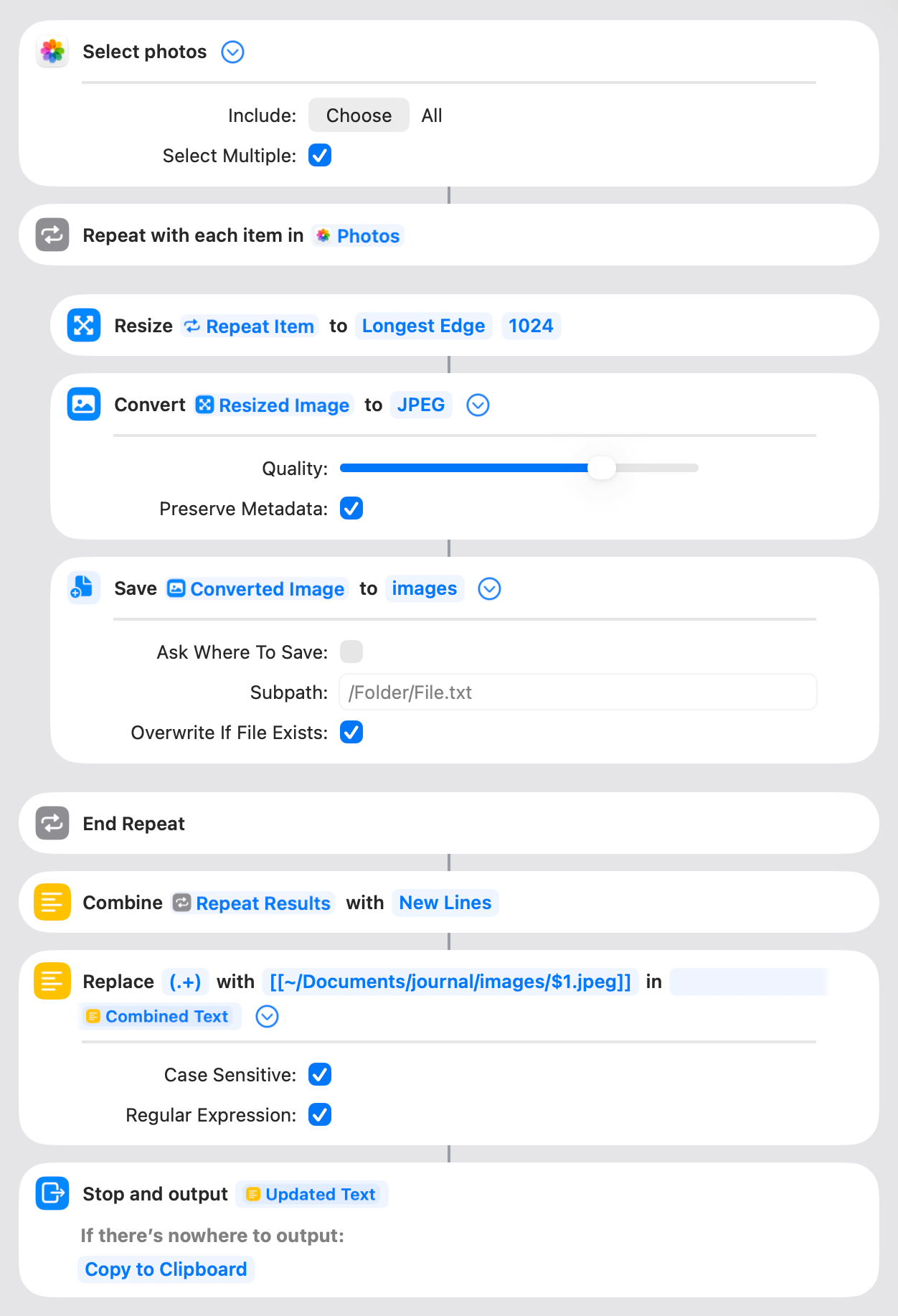
The first action lets you select photos. Then, it resizes each one and saves them as JPEG files to ~Documents/journal/images/. Lastly—and this is the part that needs to get back to Emacs—it turns each filename into an Org-style link and outputs it.
So, what does Emacs do to call this (and receive it?) It is an extremely simple bit of Lisp code:
(defun wm-journal-photos ()
    "Select photos, export, and insert as org links."
  (interactive)
  (insert (shell-command-to-string
           "shortcuts run \"Photos to Org link\" | cat")))
The shell-command-to-string function does what it says: runs a command and gets its output as a string. That string just gets inserted at point. The location and weather Shortcut is even simpler: it just calls the “Get weather at Current Location” action, then creates a text block with LOCATION and WEATHER as Org-mode properties.
(Why, you might ask, does shortcuts run have to be piped through cat to work? You got me. It’s not an Emacs quirk, for the record, it’s an Apple quirk.)
To support my writing, throw me a tip on Ko-fi.com!
©
2025
Watts Martin
·
License: CC BY-NC-SA 4.0
Contact: Mastodon ·
Bluesky ·
Email