Org Mode, Marked, and Workflows
Last year, I wrote an article called “Seriously, Markdown” in which I gently dismantled the “nobody can do serious writing in Markdown” arguments that come up every so often. I got some pushback, none of which I confess I found particularly convincing because they invariably rehashed points I addressed in the article. Also, people who got their hackles up tended to gloss over the part where I wrote,
I’m not saying “give up and just use Markdown.” Being familiar with another markup system is a powerful argument for staying with it, for a start, and there are other reasons to use something else that have nothing to do with markup. There are specific kinds of technical documentation […] where AsciiDoc is your only practical alternative to full-bore SGML/XML. And as a newly anointed Emacs nerd, I find myself using Org Mode daily at work, and that includes writing extensive notes using its markup system, not Markdown.
So. Something else I wrote was:
When you focus purely on the markup semantics, it’s hard to argue that any other system is “better” than Markdown.
Which is true. The thing is, the obverse is also true: when you focus purely on the markup semantics, it’s hard to argue that Markdown is “better” than any other system. I’ve been doing more writing in Org Mode lately, partially just as an experiment, and partially because—as I’ve noted more than once—the strength of Org Mode isn’t the markup part, it’s the mode part: properties and tags and dates and other bits and bobs entirely outside Markdown’s purview. Here’s a few things I’ve noticed:
- While writing italics like
/this/rather than_this_or*this*looks a little dorkier, it’s still perfectly readable as plain text, and it’s marginally faster to type: you can type a / without hitting SHIFT. That’s a tiny thing, but if you use italicstoo muchfrequently it adds up. - Using Org Mode for complex formatting still requires dropping to HTML once in a while just like Markdown does (e.g., setting the opening words of a fiction story, or a ALL-CAPS PHRASE IN BODY TEXT, in small caps), and Org is clunkier for that. “Markdown is so limited you have to eeeeeewwwww use HTML or template-specific macros” is a common knock among the anti-Markdown crowd, but sorry, Markdown got it right here.
- If you want to work with anything outside of Emacs, things get hairy real fast.
I’ve written a few little “helper functions” to copy text as rich (formatted) text or HTML, as well as get the current Safari page and paste it in as a link; I’ve worked to make these work with both Org Mode and Markdown transparently. The key, as is so often the case, is Pandoc. But what I’d lost with Org Mode was Marked, a tremendously over-engineered Markdown preview program for the Mac. I don’t think I need its export tools anymore—I’ve built my own, for both Markdown and Org, inside Emacs at this point—but it has some really neat proofreading tools, particularly with respect to visually highlighting overused words, that I really missed. It’s easy to get Marked to work with Emacs’ Markdown mode, but as the name implies, it’s just for Markdown files.
Well, as it turns out, Marked 3 supports custom processors, and you can configure it to use Pandoc so it works with Org Mode files transparently.
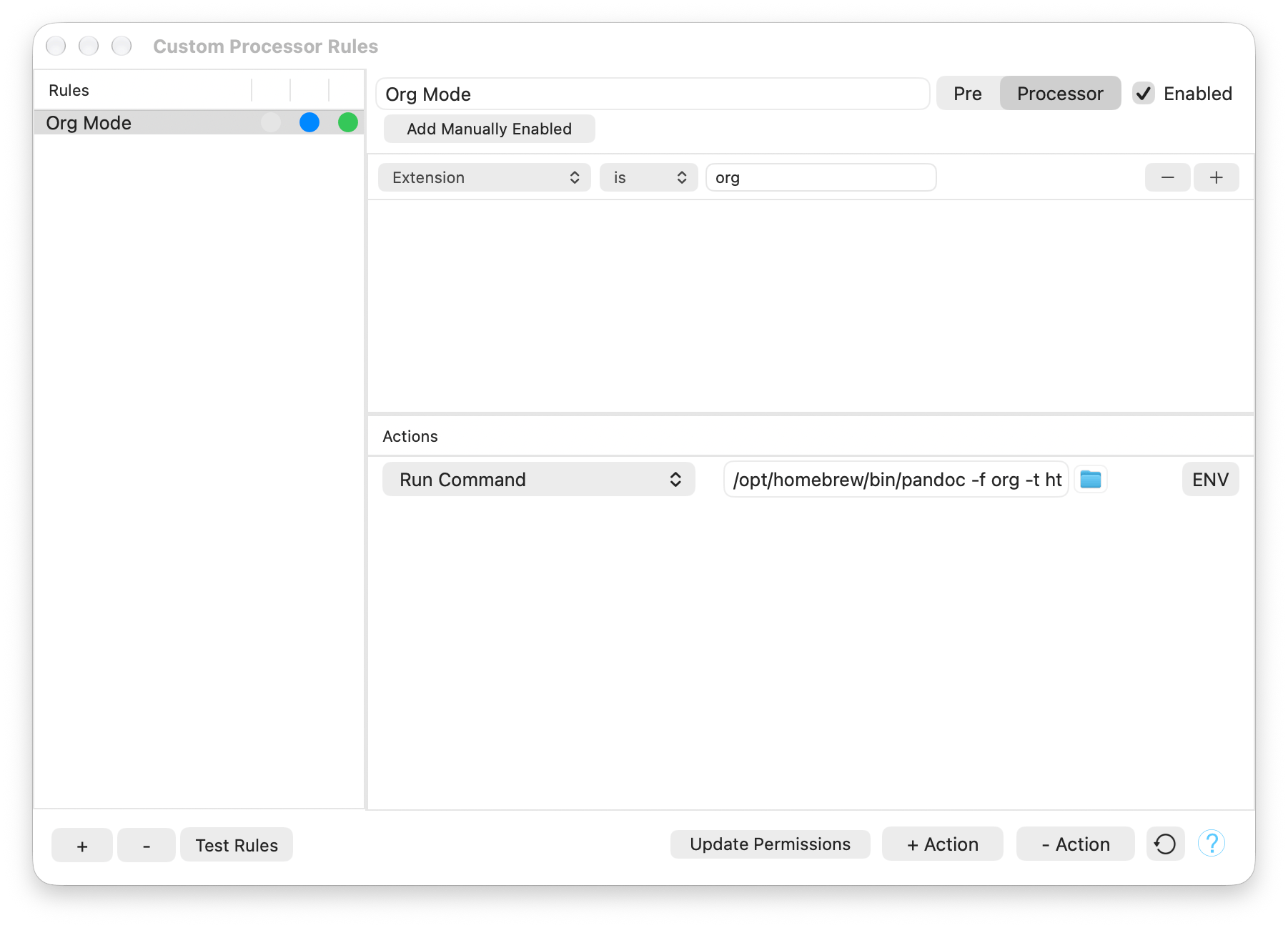
- In Marked 3’s settings, click Processor, then Custom Rules.
- In the dialog box, click + to create a new rule and name it “Org Mode”.
- There’s a selection for “Pre” or “Processor”. Choose Processor. (This replaces the internal Markdown processor completely for this rule.)
- In the conditions box, select “Extension”, “is”, and fill in
org. - In the Actions box, select “Run Command”, then
/path/to/pandoc -f org -t htmlas the command—using the actual path to thepandoccommand line program, of course. - Make sure the rule is enabled.
When you’re finished, the rule window should look something like this:
I use a Transient menu command to trigger the preview, in the set of “export” commands I’ve set up for Markdown and Org files. This command will work on both, since Marked is the one determining which processor to use, not Emacs.
(defun wm/preview-in-marked (args)
  "Preview in Marked."
  (interactive (list (transient-args 'wm/export)))
  (save-buffer)
  (shell-command
   (concat "open -a \"Marked\" \""
           (wm/escape-double-quotes (buffer-file-name))
           "\"")))

(defun wm/escape-double-quotes (str-val)
  "Return STR-VAL with every double-quote escaped with backslash."
  (save-match-data
    (replace-regexp-in-string "\"" "\\\\\"" str-val)))
Why not just stick with Markdown?
Honestly, I often do. The few non-Emacs editors for Mac and iOS that support Org are clearly not built around the idea of writing long-form prose with them, so if I’m out with the iPad or want to edit on the iPhone, using Org is a chore. (Authors: please do some basic bold/italic/heading/etc. formatting in the editor as we write, and if you’re going to bundle fonts, include the files for italics and bold.) Conversely, Emacs’s Markdown mode is terrific. I’m writing this blog post in Markdown because that’s what Zola uses, and insisting on writing in Org would invariably add extra steps I don’t need. Like it or not, the rest of the plain text world has largely standardized on Markdown, and if you have to work with that world, using anything else is fighting against the tide.
But, if you really are working primarily in Emacs, let’s face it: you’re kind of used to being in your own world anyway. In Emacs, not using Org is often fighting against the tide. Fortunately, Emacs’s extreme flexibility lets you sidle Org into workflows that might not otherwise expect it.
To support my writing, throw me a tip on Ko-fi.com!
©
2026
Watts Martin
·
License: CC BY-NC-SA 4.0
Contact: Mastodon ·
Bluesky ·
Email